
Basketball Stars: Multiplayer
Miniclip.comSports
4.6110.68K Reviews
- Version
- 3.2.0
- Installs
- 100.00M
- Age Rating
- Everyone
Screenshots
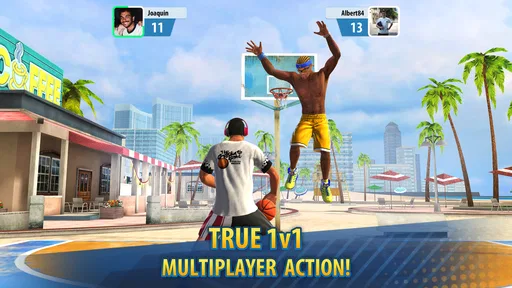
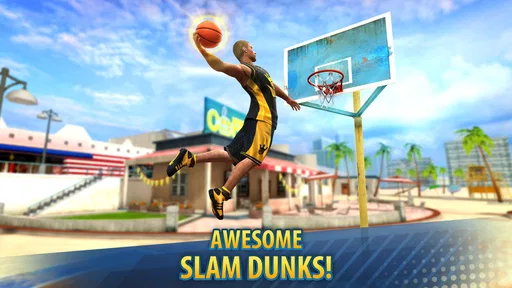
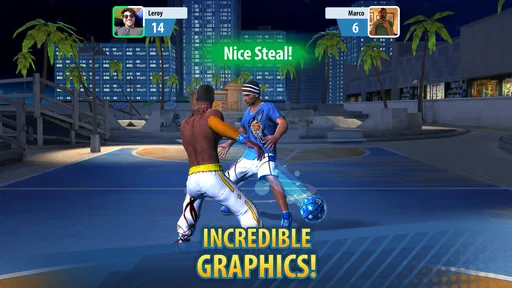
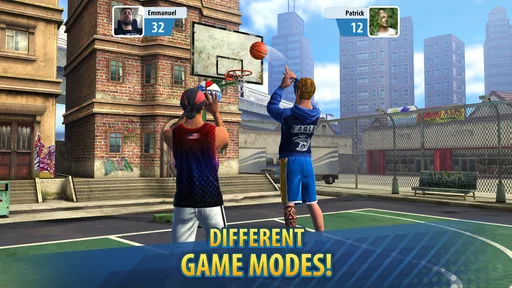
Our Review of Basketball Stars: Multiplayer
 Analysis by Appyee
I often see phones passed around during a quiet stretch at home: one person wants a quick game, someone else asks to try, and suddenly the device has become the shared entertainment. Basketball Stars: Multiplayer fits that kind of moment well because its basketball matches are built around direct competition rather than a long, complicated setup. I like that a new player can get a feel for the action quickly, while someone who already knows the game can still care about timing and decisions.
That convenience comes with a practical household question: who is playing, and whose progress or purchases are involved? I would decide that before handing over a device, especially if several people use the same phone or tablet. A quick game can turn into a longer session once the competitive loop takes hold, so it helps to agree on when the device is available and whether spending is off limits.
A quick match works best when expectations are clear
For a realistic everyday example, imagine waiting for dinner to finish or sitting through a short break between errands. A basketball match can make that pause feel less dull, and the head-to-head format gives the session a clear purpose: play, react, and see how you do against another person. I would treat it as a short burst of play rather than assume every visit will stay brief. Competition has a way of making “one more” feel tempting.
When a device is shared, I’d also make a simple handoff routine. Let the next player know when a match is finished, and check that the right person is using the game before continuing. That small habit avoids the frustration of someone else changing a player’s progress or spending currency without meaning to. I’m not suggesting the game provides household profiles or parental tools; the useful boundary here is the one people set around the device.
What to decide before another player takes a turn
Because the game includes progression and optional purchases, shared use deserves a little more thought than passing around a purely offline puzzle. The listed in-app purchase range runs from $0.99 to $99.99 per item, so I would agree in advance that purchases need the device owner’s permission. If a child is using the phone, an adult should handle any payment decisions and explain that unlocks are not necessary just to try a match.
There is a difference between letting someone play and giving them open-ended access to an account or payment method. I’d keep that distinction clear, avoid leaving a purchase decision to a young player, and make sure the owner is comfortable with the game’s current session before handing the phone over. If you want every player to have separate progress, a shared device may not be the neatest arrangement; check how the game behaves on your own device rather than assuming it offers separate household accounts.
Multiplayer adds energy, but it also sets the pace
The appeal here is the feeling of competing against another person, not simply repeating a solo drill. That makes the game a better fit for friends or relatives who enjoy a little friendly rivalry and can take a loss in stride. It is less suitable for someone who wants a quiet, interruption-proof activity. A real-time opponent may not be able to wait while the phone changes hands, so I’d finish the current match before pausing or passing the device along.
One useful approach is to make the competition playful rather than turn every result into a judgment of skill. Players can trade turns, compare what worked, or set a household rule that the person who loses chooses the next activity. That is not a game feature; it is simply a way to keep the shared experience enjoyable when one player is more practiced. If the difference in ability makes matches feel lopsided, a solo or turn-based basketball game may be a better choice for that particular group.
Age, spending, and a sensible level of trust
The game is rated Everyone, which makes it broadly accessible by age, but I would still think about the individual child and the household’s expectations. Cartoon-style presentation does not automatically make competitive play right for every younger player. Some children enjoy the challenge; others may get frustrated by losing or find it hard to stop after a close match. A parent can judge that more accurately than an age label alone.
For adults deciding whether to introduce it at home, I’d focus on three practical questions: is the child comfortable with competitive play, are purchases clearly off limits without permission, and can the device be handed back when asked? Those are more useful checks than assuming the rating settles every family decision. The game is free to start, but optional purchases mean that “free” should not be taken to mean that every item or upgrade has no cost.
Who will enjoy this kind of basketball game?
I’d recommend it to players who want basketball-flavored competition in a compact mobile format and like improving through repeated matches. It can also work as a light shared activity for people who already enjoy comparing scores or challenging one another. If you’re new to mobile sports games, the straightforward controls make the first session less intimidating than a simulation that asks you to manage a full team and learn a large set of commands.
On the other hand, I’d look elsewhere if you want a realistic, full-court basketball simulation, a deep management game, or a guaranteed offline pastime. A head-to-head focus is naturally more dependent on being ready to play against another person than a solo career or arcade mode. And if your priority is an experience that can be paused instantly whenever family life interrupts, a noncompetitive game may be more forgiving.
Jumping Into the Game
When you first fire up Basketball Stars: Multiplayer, you're immediately hit with a slick interface that's as vibrant as a courtside seat. The game is designed to pull you in, and it does a great job of doing just that. The controls are intuitive, which means you won't spend ages trying to figure out how to dunk or dribble. It's all about quick reflexes and a keen eye for the hoop. I found myself getting the hang of it in no time, which was a pleasant surprise.
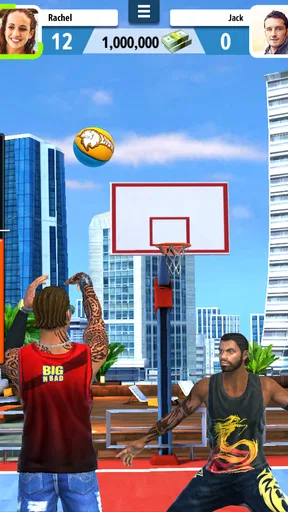
The game modes are where the game really shines. You’ve got your classic 1v1 matches where you can challenge players from around the world. The matchmaking system is pretty reliable, ensuring that you’re paired with someone at your skill level. There's also the "Attack-Defend" mode that adds a strategic layer to your gameplay. You’re not just shooting hoops; you’re outsmarting your opponent, which adds a nice competitive edge.
Graphics and Sound
Let’s talk about the graphics. They’re pretty sweet, with a style that’s both colorful and detailed. The characters have a cartoonish vibe that's fun without being overly kiddish. The courts are diverse, and each has its own unique flair, making sure you don't get bored of the scenery. I must admit, the attention to detail makes it feel like you’re really part of the action.
As for the sound, it complements the graphics perfectly. The background music is upbeat and keeps the adrenaline pumping. The sound effects are spot-on too; from the swish of the net to the thud of the ball bouncing on the court, everything adds to the immersive experience.
Customization and Upgrades
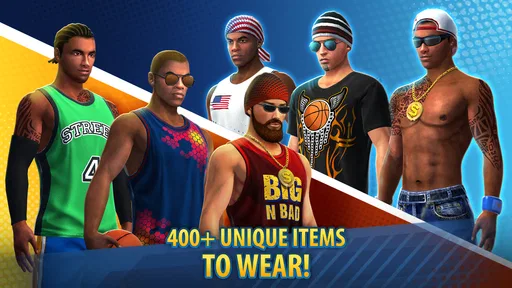
This game gives you plenty of options to customize your experience. You can unlock new basketballs, outfits, and more. Each upgrade feels meaningful and gives you an edge in the game. You can earn these through playing, but there are also in-app purchases if you’re impatient like me. Honestly, the customization options are a big part of what keeps the game fresh and exciting.
Another cool feature is the ability to upgrade your player’s skills. Whether it’s improving your shooting accuracy or your defensive prowess, you can tailor your player to fit your style. This adds a layer of depth that keeps you coming back for more.
What Keeps You Hooked?
One of the reasons I keep coming back is the community. The game has a thriving player base, and the competitive aspect keeps you on your toes. The developers, Miniclip.com, also seem to listen to feedback, rolling out updates and new features regularly, which is always a good sign.
There’s also a sense of progression that’s highly rewarding. Whether you’re climbing the ranks or simply improving your skills, there’s always something to strive for. It’s this blend of competition and personal growth that makes the game so addictive.
How it compares with other mobile basketball games
Compared with the usual alternatives in mobile sports games, this one puts quick player-versus-player contests ahead of building and directing an entire team. That focus is its clearest strength: I can concentrate on a personal contest and learn from each exchange instead of managing a roster. It is also a trade-off. Fans who want tactical substitutions, season planning, or a broad simulation of basketball may find a team-based game more satisfying.
For a casual player, the most useful skill is not tapping as quickly as possible but paying attention to the rhythm of each matchup. I’d avoid spending upgrades simply because a loss feels frustrating. Play enough to understand what kind of player you enjoy being, then put earned improvements toward that style. It is a more considered way to use progression than trying to buy a shortcut before you know what actually helps you.
The game is free, and its broad reach is reflected in more than 100 million installs, with an average rating of 4.6 from around 1.7 million ratings. It is a sports game from Miniclip.com, first released on March 16, 2016; version 2.1.10 supports Android 6.0 and later. Those details make it easy to see why it is familiar to many mobile players, but popularity does not change the basic fit question: it works best when you want direct, brisk competition rather than a deep simulation.
Small choices that make sessions smoother
I’d use the early matches to learn the controls before worrying about customization. Once the basic actions feel natural, pay attention to which moments make you miss or give the other player an opening. That gives upgrades a purpose: you can decide whether to strengthen a weakness or reinforce the way you already like to play. This is more useful than treating every available improvement as equally important.
Another practical trade-off is sound. The energetic audio helps the court feel lively, but in a quiet room or shared space I’d lower the device volume or play with sound off. The visuals and match structure still carry the experience, while reducing sound makes it easier not to disturb other people. It is a small adjustment, but especially helpful if someone is playing during a family gathering or while others are winding down.
Before installing, it is worth checking that the device is compatible: the Android minimum is version 6.0. The game is free to download and rated Everyone, while optional purchases mean that anyone sharing the device should understand the household’s spending rules. I also wouldn’t promise a child that every customization item can be earned quickly; it is better to let them explore progression at their own pace and keep payment choices with the adult who owns the device.
When I’d choose something else
Although I enjoy the competitive format, it is not the right pick for every basketball fan. If you mainly want to practice alone, follow a long career, or control a complete team, the focused match structure may feel narrow. Someone who dislikes real-time competition may prefer a solo sports game where pausing and playing at their own pace is central. Likewise, players who get annoyed by cosmetic unlocks or optional spending may be happier with a paid game that offers a different progression model.
It is also worth remembering that multiplayer enthusiasm depends on the people around you. If friends or family do not enjoy sports games, the social draw may not matter much, even though you can face other players. I would try it because the core action interests me, not because I expect a household full of basketball fans to appear. That keeps expectations realistic and makes it easier to decide whether the game is worth returning to.
My household verdict
As a shared-device option, I see it as a good fit for short, friendly challenges between people who can take turns thoughtfully and respect the device owner’s account and purchase boundaries. It offers enough skill and customization to keep a regular player interested, but those same progression hooks can make it harder to stop or can raise questions about spending. A simple rule about match handoffs and purchases solves more than any assumption about who should be playing.
Basketball Stars: Multiplayer has a lively presentation, accessible controls, and competitive matches that make it easy to understand the appeal. I’d recommend it to someone who wants a quick sports challenge and enjoys improving through play; I’d steer a simulation fan or someone seeking a wholly solo, interruption-friendly game toward another option. For a household, it is best treated as a shared activity with clear boundaries rather than a device everyone can use without checking whose session is active.
Wrapping It Up
In conclusion, the game is more than just a game about shooting hoops. It’s a thrilling multiplayer experience that mixes strategy, skill, and a whole lot of fun. Whether you’re a basketball fanatic or someone looking for a new gaming fix, this app has something for you.
So, grab your virtual basketball and hit the courts, because Basketball Stars: Multiplayer is ready to take your mobile gaming to new heights. Trust me, once you start playing, it’s hard to put down. See you on the court!
Privacy and Permissions
See what permissions an app requests and how it handles your data.
- Wi-Fi connection information
- view Wi-Fi connections
- Other
- view network connections, full network access, run at startup, prevent device from sleeping, Google Play license check
Verdict
Strengths of Basketball Stars: Multiplayer
- Smooth and responsive controls enhance gameplay.
- Wide variety of customization options.
- Engaging multiplayer matches.
- Regular updates with new content.
- Stunning graphics and animations.
Limitations of Basketball Stars: Multiplayer
- Occasional lag in multiplayer mode.
- In-app purchases can be pricey.
- Ads can be intrusive at times.
- Requires constant internet connection.
- Limited offline gameplay options.
Other Releases by Miniclip.com
View All
8 Ball Pool
Sports4.8

Carrom Pool: Disc Game
Sports4.4

Pure Sniper: Gun Shooter Games
Action4.8

Football Strike: Online Soccer
Sports4.8
Similar Picks in This Category
View All8 Ball Pool
Miniclip.com4.8

Pooking - Billiards City
AIM TOP GAME TECHNOLOGY LIMITED - pool4.6
Carrom Pool: Disc Game
Miniclip.com4.4

EA SPORTS FC Soccer Mobile 26
ELECTRONIC ARTS4.6

World Soccer League
mobirix4.3

Soccer Cup 2026: Football Game
INLOGIC SPORTS - football tennis golf soccer4.3
You May Also Like
View All

Frequently Asked Questions
What platforms is Basketball Stars: Multiplayer available on?
Basketball Stars: Multiplayer is available for both Android and iOS devices. You can download it from the Google Play Store for Android users or the Apple App Store for iOS users. Ensure your device meets the game’s system requirements for optimal performance.
Is Basketball Stars: Multiplayer free to play?
Yes, Basketball Stars: Multiplayer is free to download and play. However, it does offer in-app purchases for various items like new gear, customizations, and boosts. These purchases are optional and designed to enhance your gaming experience.
Can I play Basketball Stars: Multiplayer offline?
No, Basketball Stars: Multiplayer requires an internet connection to play. The game is designed to provide a competitive multiplayer experience, requiring a stable online connection to match you with opponents and sync game progress.
How do I improve my skills in Basketball Stars: Multiplayer?
To improve your skills in Basketball Stars: Multiplayer, practice regularly to get better at timing your shots and defending against opponents. Engage in training modes, participate in tournaments, and upgrade your character's skills and equipment for better performance in matches.
Are there any social features in Basketball Stars: Multiplayer?
Yes, the game includes various social features. You can connect with friends, challenge them to matches, and compare stats on leaderboards. Engaging with the community can enhance your experience and provide more competitive matches.
Play our best games!


